

How to become a user of the e. Statistics system without being able to identify yourself through the Electronic Government Gateway
The e.Statistics system can only be used by a respondent’s representative registered in the system. If you do not have the opportunity to identify your identity through the Electronic Government Gateway, the only way for you to become a system user or appoint a representative who will not have the opportunity to identify his/her identity through the Electronic Government Gateway is to submit to the State Data Agency the Consent Form for Providing Data Electronically (hereinafter referred to as the “Consent Form”). The State Data Agency will forward the received document to responsible employees who will create login and representation accounts for the specified person or persons.
Once the accounts are created, an automatic message containing a login link will be sent to the representative specified in the Consent Form at the email address specified in the annex to this document “Data on the user of the electronic statistical data preparation and transmission system”.
Click on the link sent and you will be taken to the e.Statistics system login window (Fig. 1).
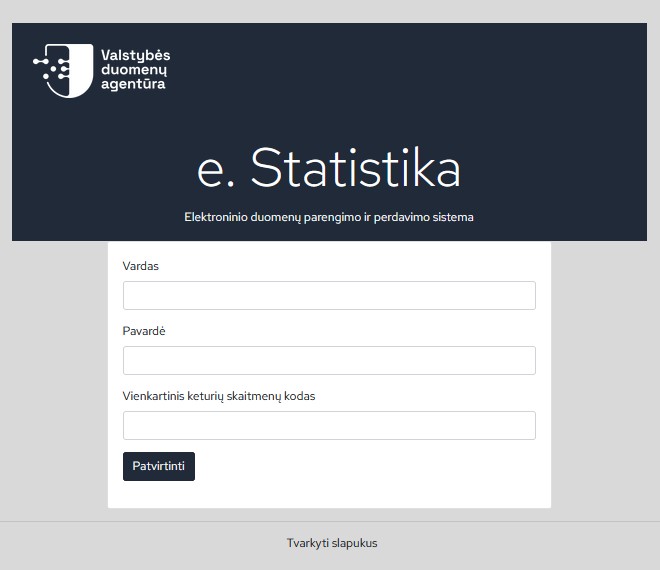
Figure 1. Login to the e. Statistics system window (indicates a one-time identification code)
In the window that opens, enter data of the data provider representative that was specified in the Consent Form: name, last name, as well as a one-time four-digit code that was specified in the annex to this document “Data on the User of the Electronic Statistical Data Preparation and Transmission System”. This code is used as a means of confirmation that the person who created the login account is really the one connecting.
If the e.Statistics system finds the representative based on the entered information, a login password creation window opens (Fig. 2).
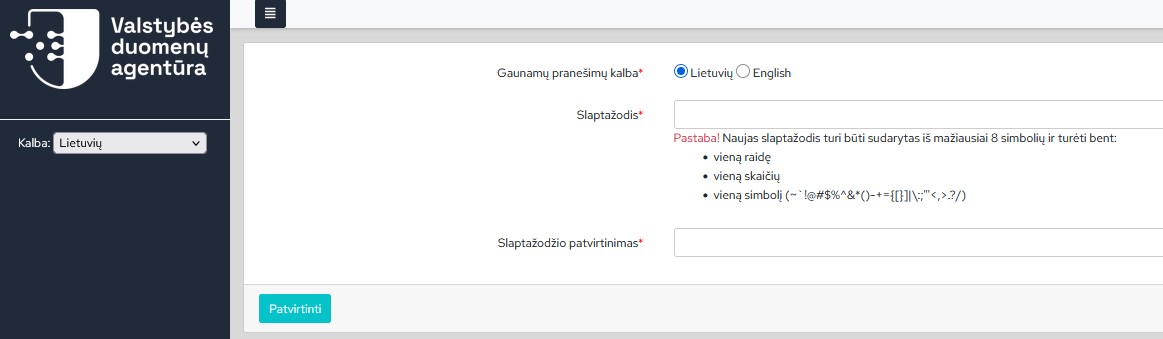
Figure 2. Login password creation window
Create a password that you will use in the future when connecting to the e.Statistics system:
- Password – enter a new password (a password should consist of at least 8 characters and contain at least one letter, at least one number and at least one symbol (~`!@#$%^&*()-+={[}]|\:;"'<,>.?/);
- Password confirmation – repeat a new password. After entering the information, click the [Confirm] button.
If the created password is correct, the Login to the e.Statistics system window opens: (Figure 3).
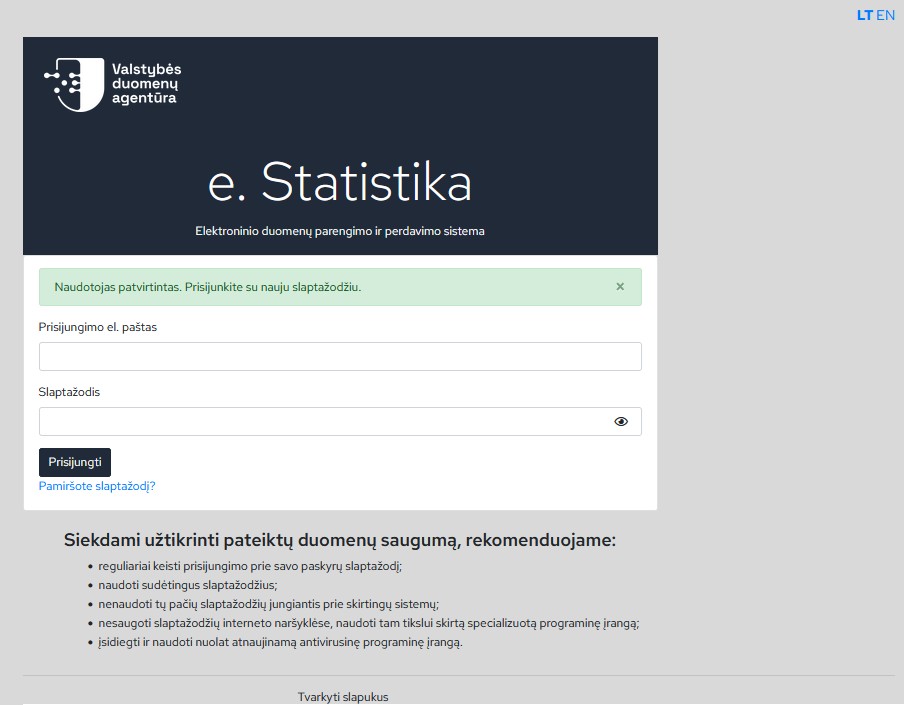
Figure 3. Login to the e. Statistics system window
Login email addres– the email address is specified in the annex to the consent form “Data on the User of the Electronic Statistical Data Preparation and Transmission System”. It must be unique and cannot be used by several representatives.
After logging in to the e.Statistics system, the representation accounts waiting for approval can be immediately seen on the screen (Figure 4). If there is more than one account, they are submitted for approval one after the other.
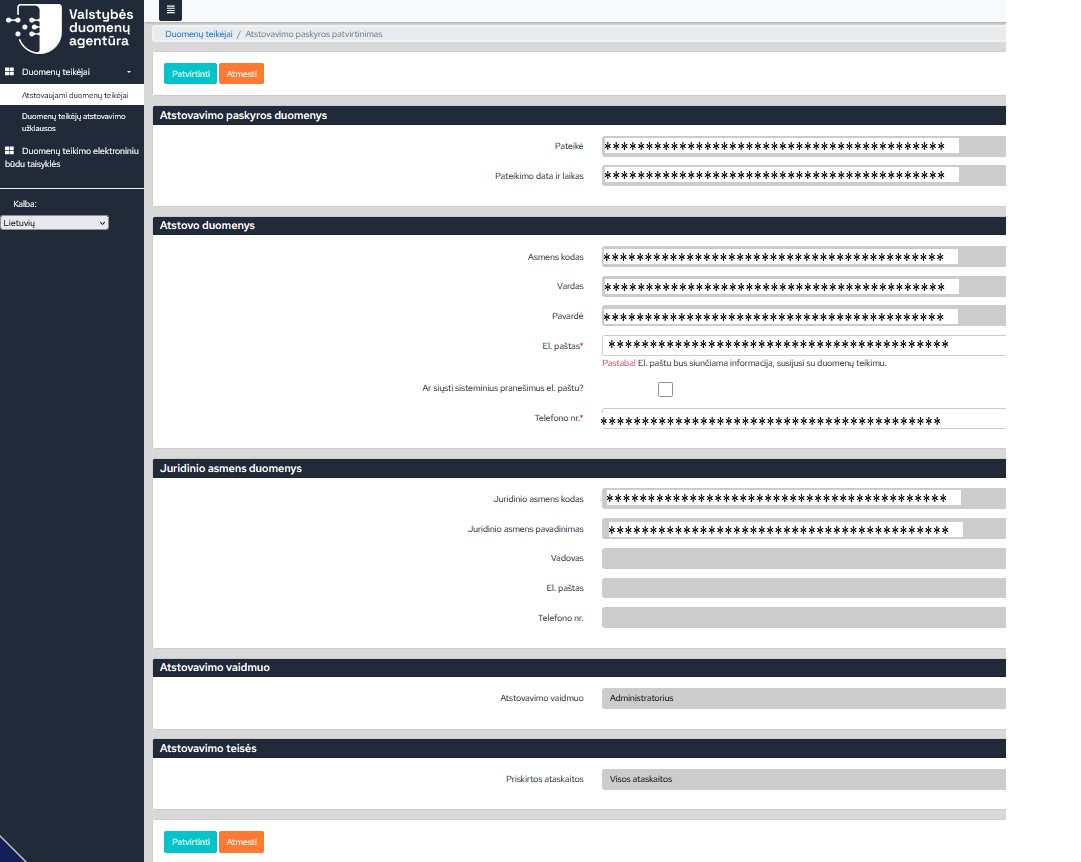
Figure 4. Assigned Representation Preview Window
If this is the data provider you are working with, select [Confirm]. If for some reason you do not want to represent the assigned data provider – click [Reject].
Attention!Since this user logged in to the e.Statistics system without identifying his identity through the Electronic Government Gateway, his rights to manage the login account data are limited.If there is a need to change the login e-mail, last name or if you have any questions, please contact the State Data Agency by mobile phone: + 370 689 76 725 or by email: [email protected].
Last updated: 26-02-2026